Complete wedding photography checklist for digital photographers
Been asked to photograph someone's wedding? Congratulations! Do you have
your wedding photography checklist ready?
 |
Here you will find a useful checklist covering who to photograph. But this wedding photography checklist goes further!
You will find checklists covering the other essentials a digital wedding photographer needs too.
After all, not much point arriving with your list of subjects if you've forgotten to pack the memory cards!
This wedding photography checklist is broken down into four sections: For further help and advice about posing the bride and groom, and in fact any other aspect of wedding photography, read on and I'll show you where to get the best, instantly downloadable, package. It covers all the wedding photography essentials (poses checklist, business agreements, wedding photographers secrets and more...).
If it's just a simple wedding photography checklist you're after here's a printable checklist that covers everything you will need - including a list of subjects - for digital wedding photography.
It's those extra little personal touches
Prior to the event:
Arrange to meet the couple at least a week before the wedding. You need to go through your wedding photography checklist with them to get a good idea of what they expect of you on the day. Things to go through are:The style of photography
Black and white? Formal? Reportage (sometimes called photojournalistic wedding photography).Meet the guests!
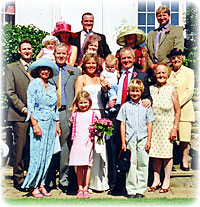 If possible, meet the really important family members beforehand.
Or maybe see some photos of them so that you recognize them on the day.
If you can wander up to the father of the bride with a confident "Hi, Bill isn't it? You must be very proud. I'm your daughter's photographer".
Bill will be chuffed to bits that you did a little research prior to his daughter's big day.
What will you wear?
This is an important part of your wedding photography checklist. And it has nothing to do with actually taking photographs!If your bride and groom are going for a really casual look then you might look a little out of place in a formal suit. And if they are going for the formal look themselves, then don't overdo it! You not there to out-shine the bride and groom. Do what is necessary in order to fit in nicely.
NB:It is sometimes a good if you can stand out a little though. It marks you out as the photographer and people will know how to react to you. Of course, being weighed down like a pack-horse with camera equipment should mark you out to everyone, regardless of what you wear!

Payment
It can be a little awkward to raise this, but it should be on every wedding photography checklist.If it's friends or family you are photographing this can be even more tricky. You won't want to rip them off, but equally, they won't want to rip you off either!
Perhaps you only want to cover costs? Maybe your photos will be your gift to them? Whatever the situation it's important to come to an agreement, no matter how large or small.
Make sure you have payment on your checklist, because people feel more comfortable when they know where they stand.
It will also mark you out as more professional. If you want pre-written agreements that you can modify to your own needs (there's no point trying to re-invernt the wheel!) there are a selection in the wedding photographer's e-package.
Who's wedding is it?

An important wedding photography tip - when completing your wedding photography checklist make sure you talk to the bride and groom - in advance!
Always, always
remember that it's their wedding, not yours. This applies no matter how
close you are to the happy couple.
The reason it is important to talk to them in advance is twofold.
First, they may well be friends or relatives of yours, but they will
still expect a certain level of professionalism from you. Going through
your wedding photography checklist with them in advance is an important
part of that professionalism.
Second, it helps you to know exactly what is expected. This will come
across on the wedding day itself. Especially to their guests, whom you
probably don't know too well - if at all.
Finally, make sure you go through the other
aspects of the wedding photography checklist.
Good luck! If you're well prepared it should go well.
And if you are still a little unsure of yourself this complete wedding photographer's kit might just ease any sleepless nights!
Or, if it hurts your ears as much as it does mine, pass the link on to someone who'll really appreciate it.
 Get help using your camera with the complete Digital SLR Guide |