Model-ish
by Joie
(Philippines)

model-ish
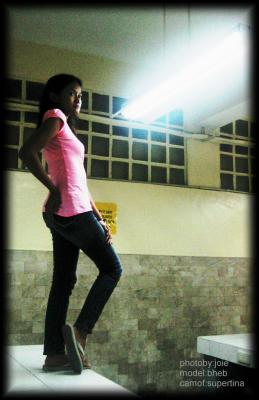
I wanted to capture my block-mate and I wanted her to look like a model.
She's on top of a table in our Botany Lab. I used the fluorescent light to have some effect.
I just used a digital camera and placed border by using Adobe Photostudio. ^^,
Well done Joie, this looks like a great image. The pose and the lighting are spot on - dramatic, and rugged!
My only criticism concerns the background - unfortunately my eye is constantly drawn to that yellow poster peeking out from behind your model.
I like the spot of yellow in the image (it adds to the overall feel of the photo), I just don’t like the way it is half hidden.
Perhaps if you had moved slightly to your right the poster could have been captured whole. I would have aimed to placed it half way between your model and the right side of your frame.
Well done to use a frame - It’s a great way to draw the viewer into the photo. A vignette is another way to draw the viewer in. Click to read a Photoshop tutorial on how to create a vignette effect.
Well done!
(As always, any other comments are most welcome - Ed)
 |
Comments for Model-ish
|
||
|
||
|
||
|
||
|
||

Or, if it hurts your ears as much as it does mine, pass the link on to someone who'll really appreciate it.
 Get help using your camera with the complete Digital SLR Guide |