Cross-processed windmill
by Joao Victor
(São Gonçalo, Brazil)
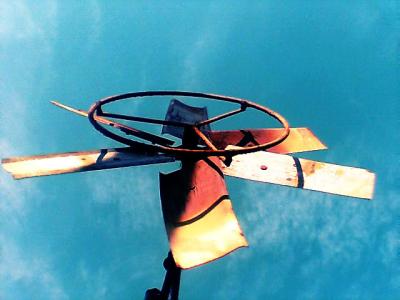

My father made this steel windmill for me when I was a child. It is approximately 50cm wide and is on the top of a 2 metres steel pole.
This picture was taken with a cell phone camera. The light was very good, and I liked the shadow caused by a huge cactus we have in our garden ;)
The picture looked fine, but I decided to experiment a little with Photoshop. I tried the cross-processing as explained in this site, and well, this is the result.
I like this shot. It’s interesting. Abstract, and interesting. I’m interested in both the photo itself, and the story that goes with it. Thanks Joao for sharing that with us.
I don’t remember my father making any windmills for me. I was lucky enough just to get help with an Airfix kit!
But back to the photo . . . There’s a lot to like in this photo. Good strong colours – the blue sky contrasting with the orange on the windmill.
There are also some good strong shapes here, from both the vanes on the windmill and the shadow cast by the cactus.
It’s the perfect photo for a little Photoshop-ing! Why do I say that? I’ll bet that before it was Photoshop-ed the colours were a bit wishy-washy.
Don’t forget that using software like Photoshop isn’t photographic cheating. It’s good practice. Many people forget that we were doing these sort of enhancement tricks long before Photoshop was invented.
It just took a little longer, and we shut ourselves in dark rooms to do it!
Creating a cross processing effect in this photo has turned it from a lifeless shot to one that makes us linger over it just a little longer.
You can read the cross processing Photoshop tutorial here.
As for improvements – well, I have just one – crop! The photo is a little unbalanced. Cropping out some of the empty sky above the windmill would improve it a little. As would cropping out a little of the area to the right – to balance it with the space to the left of the windmill.
There’s a digital photography tutorial how to crop here. And for help on using the crop tool in your image editing software, try this digital photography tutorial – the crop tool.
Ed.
Like to comment? Use the box below:
 |
Return to Digital photography tutorials.
Or, if it hurts your ears as much as it does mine, pass the link on to someone who'll really appreciate it.
 Get help using your camera with the complete Digital SLR Guide |