Digital Photography Tutorials - Photographing Seagulls
Sandra Hayes submitted the photo below to the digital photography tutor page to be critiqued.I liked the photo, but felt it could really do with some straightening up, and a little cropping.
(roll your mouse over the image to see the two photos)
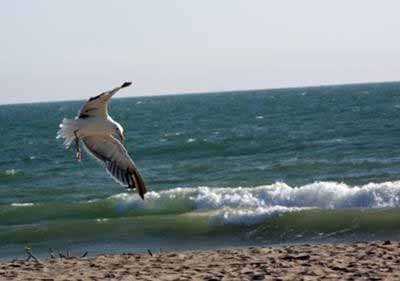
Sandra's photo is the original. When you mouse-over you are seeing my cropped version.
The changes were made in Photoshop Elements, although any basic image editing software will be capable of achieving the same result.
First I selected the crop tool, and then dragged out a box around the seagull.
Leaving the box there (i.e. not accepting the change at this point) I then moved my cursor to the bottom corner of the picture.
Here the cursor changes to a double arrow that allows you to rotate the crop.
The crop was rotated until the horizon was straight, and then the changes were accepted. You do this by clicking of the tick that appears at the top of the screen.
It should be noted that, because the starting image of the seagull was of 'web' quality, the crop has reduced image quality when compared to the original.
If Sandra did the same to her full sized original photo, she should be rewarded with a great photo!
Further reading related to cropping...
- Training your eye to be able to see where to crop a photo
- Digital photography tutorial on how to use the crop tool
- Sandra's original seagull post
My son (that's him below) loves F1. He's started his own YouTube channel and would love it if you could take a look at one or two of his videos.
Or, if it hurts your ears as much as it does mine, pass the link on to someone who'll really appreciate it.
Or, if it hurts your ears as much as it does mine, pass the link on to someone who'll really appreciate it.
(probably someone a lot younger than I am!)
 Get help using your camera with the complete Digital SLR Guide |