Beach Bum
by Steph
(Scottish Borders)
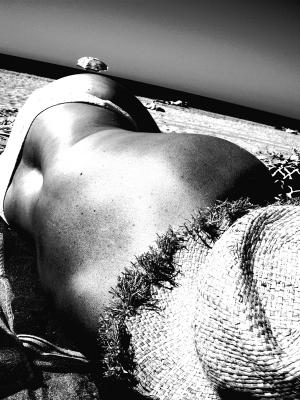

Beach Bum
This shot was taken on a beach in Crete in June 07 using a Pentax Optio S7 Digital.
The shot was a colour shot then converted to B+W.
(For convenience, all links below open in new windows)
This is a wonderfully artistic shot – well done Steph!
Regular visitors to the site will have already seen some of Steph's photos from a holiday in Crete. They were part of a theme of 'body parts'. And before I go any further, there is a tip here for all of us – set yourself a theme.
My advice is to keep the theme narrow. For example, a theme on architecture is too broad. But a theme on the architecture of just one building would work well. I would also recommend picking out the small details. Going back to the architecture of one building, you could take close ups of a door handle, the door number, detail in the stonework . . . you get the idea.
But back to Steph's photo. He's chosen an unusual angle for the photo, and this has really helped generate interest in the photo. Not only is the angle along the line of the body different, the horizon is also angled. Usually we wouldn't recommend anything other than a straight horizontal horizon. This rule can be successfully broken if the angle is significant and is done to create impact. You can read a digital photography tutorial on shooting angles here.
The conversion to black and white is also spot on. This photo has high contrast – from the blackest blacks to the purist whites – perfect! There's a Photoshop tutorial on creating a high contrast black and white picture here.
Is there anything to change? Well, only one thing leaps out at me. Follow the line of the body to the horizon and you get to the umbrella; that unfortunately appears to be sticking out of the poor girl's hips. This just seems to spoil the scene a touch. I would reach for the clone tool and get rid of it. Click to read a Photoshop tutorial on how to repair photos with the clone stamp tool.
All in all though this is a great photo. Well done Steph, and thanks for the submission.
Ed.
Want more tips? Get our recommended eBook.
Read a hands on review here
Comments for Beach Bum
|
||
|
||
|
||
|
Click here to add your own comments Return to Digital photography tutorials - submissions, February 2008. |

Or, if it hurts your ears as much as it does mine, pass the link on to someone who'll really appreciate it.
 Get help using your camera with the complete Digital SLR Guide |