Add a little color.
by Yvonne Breithaupt
(Longrbranch Wa.)
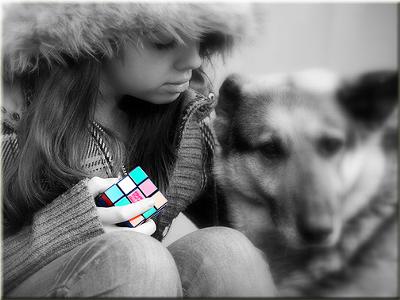

At first this photo seemed to have no taste, but after putting it in Photoshop taking the color out of everything excpet the rubix cube & then putting it through Picassa I thought it was one of my best photo's.
BTW I'm only 14.
The process of taking out the colour and then colouring back in selective areas of a photo is called colour popping.
It works well in photos that contain something that is obviously rich in colour - and the Rubik's cube in Yvonne's photo is a great example.
If you want to have a go at this effect yourself there's a Photoshop tutorial on colour popping here.
Thanks for the submission Yvonne,
Darrell.
Comments for Add a little color.
|
||
|
||
|
Click here to add your own comments Join in and write your own page! It's easy to do. How? Simply click here to return to Submit Photos. |

Or, if it hurts your ears as much as it does mine, pass the link on to someone who'll really appreciate it.
 Get help using your camera with the complete Digital SLR Guide |